
The aim of this guide is to demonstrate how to convert the IP2Proxy data from IP number ranges to individual IP addresses.
First, download the IP2Proxy data file from https://www.ip2location.com/download and extract out the IP2Proxy CSV data file..
Next, create a file called ip2proxy-to-ip-address.pl and paste the following Perl code into it.
use strict;
use Socket;
use File::Basename qw(basename);

my $script_name = basename $0;

if (($#ARGV + 1) < 2)
{
    print "nUsage: perl $script_name [input_file] [output_file]n";
    exit();
}

my $inputfile = $ARGV[0];
my $outputfile = $ARGV[1];

open my $in, "<", $inputfile or die "Cannot open input file";
open my $out, ">", $outputfile or die "Cannot open output file";
binmode $in;
binmode $out;

while (<$in>)
{
    my $line = $_;

    if ($line =~ /^"(d+)","(d+)"(.*)/s)
    {
        my $start = $1;
        my $end = $2;
        for ($start..$end)
        {
            print $out '"' . &long2ip($_) . '"' . $3;
        }
    }
}
close $in;
close $out;

sub long2ip
{
    return inet_ntoa(pack("N*", shift));
}
The Perl script is also available for download at https://www.ip2location.com/downloads/ip2proxy-to-ip-address.zip
Important note #
We will not cover installation of Perl in this guide. We will assume you have already installed Perl.
Converting the IP2Proxy data #
At the command prompt, run the following command:
perl ip2proxy-to-ip-address.pl [input_filename] [output_filename] |
The input_filename should be the name of the IP2Proxy CSV file and the output_filename can be whatever name you want.
Sample input #
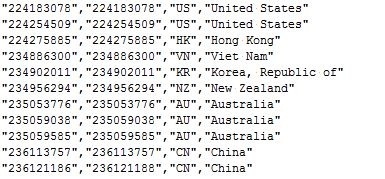
The snippet below is from the original IP2Proxy CSV data file. The first 2 fields in the file are the IP From and IP To.
There 2 fields are in the form of IP numbers.
Sample output #
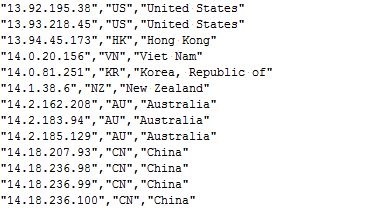
The snippet below is from the converted IP2Proxy CSV data file. The first field in the file is the individual IP address.